Affiliate marketing works a lot better when you actually have a good grip on your numbers. Tracking tools make it possible to measure which links people are clicking, what traffic sources are working, which content gets the most interest, and, probably most important of all, which conversions are turning into commissions.
With so many options out there, figuring out what tool fits your workflow the best can get overwhelming, especially if you’re just starting to grow your affiliate marketing business.

What Is Affiliate Marketing Tracking?
Affiliate marketing tracking is simply keeping track of what happens after someone clicks your affiliate link. It can show you clicks, sales, conversions, commissions, and where your visitors came from.
This information helps you understand which content and platforms are bringing results. You can then focus more on what works, test different strategies, and improve your affiliate marketing efforts over time.
If you’re completely new to this business model, start by reading my What Is Affiliate Marketing? A Beginner’s Guide before learning how to create content that converts.
Why Tracking Clicks, Conversions, and Traffic Sources Matters
Without tracking, it’s pretty much impossible to know what’s actually working. I remember running some early affiliate campaigns and thinking one blog post would be the main money maker. After finally digging into the stats, a single YouTube video was bringing in most of the conversions. Good tracking lets you:
- Find your top content: See what’s driving results, so you can make more of it.
- Stop wasting time on duds: Skip strategies and platforms that never convert for you.
- Measure ROI easily: Figure out which campaigns, posts, or emails actually make you money.
- Spot trends fast: Stay on top of new traffic sources or changes in performance.
This is especially true if you’re using multiple traffic sources, like a blog, Instagram, and email list. Knowing which source actually leads to sales helps you focus your energy smartly.
If you’re looking for step-by-step training, check out my guide on creating a personal brand online as well.
Features to Look for in Affiliate Tracking Tools
The features you should check for depend on your experience level and workflow, but a few things tend to matter for almost everyone:
- Real-time Reporting: Helps you act fast if something’s broken or blowing up.
- Custom Tracking Links: Makes it easy to tag links for different platforms, campaigns, or types of content. This is super useful for split testing.
- Conversion Tracking: Goes beyond clicks to show which actions (like purchases or sign-ups) resulted from your traffic.
- Multisource Attribution: Lets you see if the buyer came from email, social, or another content channel.
- Integrations: Connects your tracking with other tools like Google Analytics, email marketing software, or WordPress.
- Detailed Reports: Helps you drill down to the info you care about most, like commissions by product or by site.
- Ease of Use: Choose a tool that fits your comfort level. A simple dashboard is way better than a complex system you never use.
- Pricing: Make sure you check for current pricing, limits, and try out free plans or trials before committing.
When comparing tools, it’s smart to check if they offer mobile access, robust support, and advanced options like rule-based alerts or collaboration features. Some platforms have white label reporting, which is handy if you plan to share branded results with clients or contractors.
Popular Affiliate Marketing Tracking Tools and What They’re Good For
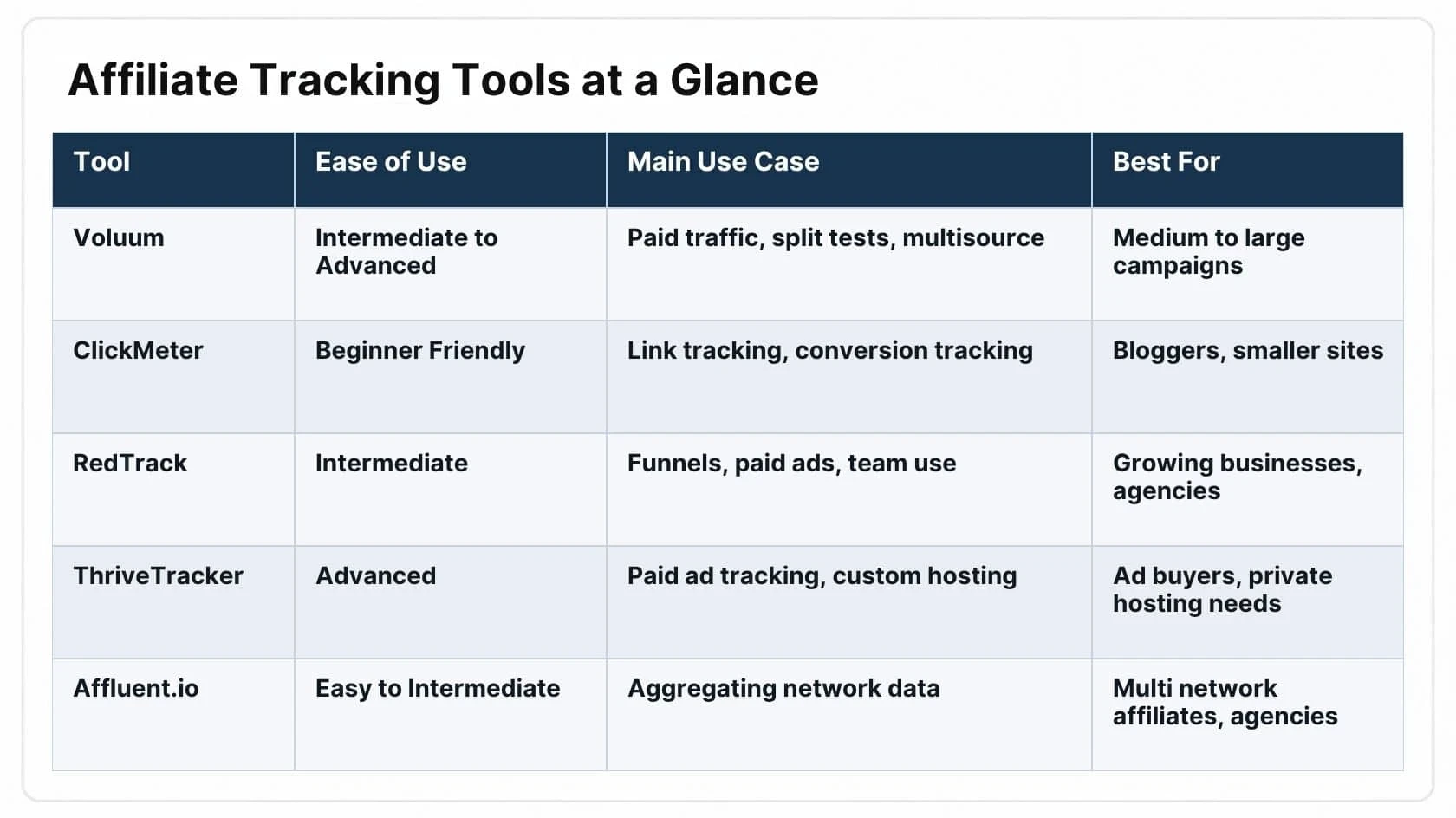
The best tool for you depends on your size, tech experience, and which affiliate programs you run. Here’s a look at some popular options, all of which have their own strengths. It’s worth checking official websites since features and pricing can change quickly.
1. Voluum
Voluum is a web-based tracker favored by marketers running a lot of traffic to multiple offers. It lets you create custom tracking links, measure conversions with pixel tracking or post backs, and analyze results by source, device, geolocation, and more. The dashboard helps break down campaigns, split tests, and retargeting, making it a solid choice for intermediate and advanced users.
Who it’s for: Affiliates managing bigger campaigns with paid traffic or lots of sources. Beginners might find the learning curve a little steep, but the reporting is really in depth.
Key features: Multisource tracking, real-time data, A/B testing, fraud checks, robust analytics, and integrations with popular ad platforms.
2. ClickMeter
ClickMeter makes it easy to create, manage, and track campaigns from one dashboard. I appreciate its link cloaking and branded tracking links, which makes sharing on social or in emails look a bit cleaner. It offers conversion tracking, split testing, and advanced reporting out of the box.
Who it’s for: Bloggers and content creators who want something simpler than Voluum but more detailed than just basic click counters. Works for both beginners and anyone with several different traffic sources.
Key features: Simple interface, link cloaking, automatic conversion tracking, traffic source breakdown, split testing, and API support.
3. RedTrack
RedTrack helps you monitor performance across your entire funnel, from first click to final purchase. The analytics dashboard lets you slice and dice data by campaign, device, country, or even specific creative. I find its event tracking pretty handy for matching up all the moving pieces when running multistep funnels (like bridge pages before sending someone to an offer).
Who it’s for: Anyone scaling up paid ads, affiliate campaigns, or who wants a single place to track everything. Also great for agencies managing clients.
Key features: Multichannel attribution, customizable dashboards, fraud prevention, automated rules and notifications, and team collaboration.
4. ThriveTracker
ThriveTracker is a solid all in one solution with flexible hosting (cloud or self hosted) and lots of traffic source integrations. There’s a focus on paid ads but also a bunch of options for tracking organic or referral traffic. Offers decent anti-fraud tools and campaign optimization features.
Who it’s for: Marketers running paid campaigns, especially those who want serious control or need to use a private hosting solution.
Key features: Flexible hosting, campaign automation, traffic source integrations, and fraud analytics.
5. Affluent.io
Affluent gets into affiliate network data by gathering up reports across lots of platforms. Super useful if you’re working with several networks and hate logging into each dashboard. Breaks down commissions, trends, and performance by date, program, or traffic source.
Who it’s for: People juggling multiple affiliate networks and looking for clean, at a glance reporting to simplify decision making.
Key features: Affiliate network integration, automated reporting, trend analysis, commission summarization, and white label options for agencies.
 Using Tracking Data to Improve Results
Tracking data can show you which content, links, and traffic sources are getting results. For example, if one blog post brings consistent sales, you can update it, improve its affiliate links, or create similar content.
If a traffic source gets plenty of clicks but few conversions, you can test the offer, landing page, or messaging. Start with a few key metrics, review them regularly, and make small changes based on what the data shows.
What to Remember When Choosing a Tool
Choose a tracking tool based on your needs, budget, and experience level. Look for an easy-to-use dashboard and the features you actually need.
Since pricing and features can change, check the official website before signing up. If a free trial or demo is available, try it first to make sure the tool works for your affiliate business.
My Pinterest Affiliate Marketing Guide shows how to attract free visitors who are already searching for solutions.
Want a Step-by-Step Way to Build Your Website?

If you want step-by-step help with website building, content, SEO, and affiliate marketing, Wealthy Affiliate can give you the tools and training to get started without figuring everything out alone. It also includes website hosting, keyword research tools, and a supportive community.
You can explore Wealthy Affiliate to see if it fits your goals. This is an affiliate link, so NicaPath may earn a commission at no extra cost to you.
Frequently Asked Questions
How do I track affiliate links?
Use unique tracking links for each platform and monitor clicks and conversions.
Do beginners need paid tracking tools?
Not always. Free options can be enough when you’re starting out.
Can Google Analytics track affiliate links?
Yes, it can track clicks, but dedicated tools provide more affiliate-specific data.
Can I switch tracking tools later?
Yes. You may need to update links and migrate your data.
What if a tracking link breaks?
You could miss clicks or commissions, so check your links regularly.
Using the right tracking tools can help you understand your traffic, measure results, and make smarter decisions as your affiliate business grows.